


MON – FRI
08:00am – 17:00pm
SAT – SUN
08:00am – 17:00pm
 SHOP NOW - All Product Categories Here















Not just a check engine code reader. Choose from a variety of compatible Apps and turn your phone or tablet into a sophisticated car scan tool to achieve more powerful features.
Compatible with cars and light trucks made since the following year in EU and UK (general OBDII/EOBD features):
2001 (gas), 2004 (diesel)
Note: 1. Apps require separate download from Google Play Store or Apple App Store; some Apps or advanced features may require separate purchase or subscription.
2. For more detailed vehicle & App compatibility, available functions, FAQ & troubleshooting, please find the latest Instructions for Use (IFU) on Amazon product page "Product guides and documents".

Torque Lite/Pro (Android only) - Popular vehicle performance, sensors and diagnostics tool.
OBD Fusion - Read DTCs & clear check engine light, create customized dashboards, estimate fuel economy, and much more, plus enhanced diagnostics & PIDs for selected vehicles.
CAR SCANNER ELM OBD - See what your car is doing in realtime, get OBD fault codes, car performance, sensor data and more!
Infocar - a smart vehicle management app that provides vehicle diagnosis and information on driving style.
DashCommand - Transform your iOS or Android phone/tablet into a customizable display and monitoring system.
BimmerCode – for BMW or Mini coding (2008+, not suitable for G series).
BimmerLink - Read trouble codes and display sensor values in real-time for BMW (2008+).
bimmer-tool (BTool, Android) - Read & clear fault codes, request DPF regeneration, read engine live data and much more for 2008+ BMW cars.
Carista OBD - Mobile DIY car mechanic in the palm of your hands - code features, diagnose warning lights, monitor live data and service your car.
JScan OBD - Read diagnostic trouble codes and live data in all modules for selected Jeep/ Dodge vehicles.
Dr. Prius - Examine the health of the High Voltage battery for Toyota/Lexus hybrid owners.
ABRP (for iOS only) - the world's most appreciated service to plan, learn and dream about Electric Vehicles.
Other compatible apps include OBD Auto Doctor, Leaf Spy Pro, Garage Pro, FourStroke, Harry's LapTimer, RaceChrono, TrackAddict, Triplog, and more to come.
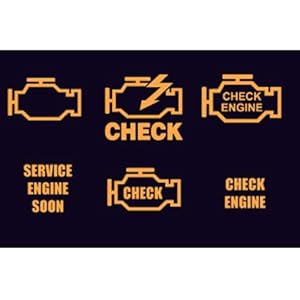
The OBDCheck BLE helps you read the error codes causing the check engine light to come on. You may then find out what the possible causes are and fix simple problems by yourself and reset the light, potentially saving you a trip to a garage and hundreds of dollars. When you need to bring your car to a mechanic, it also gives you a peace of mind.
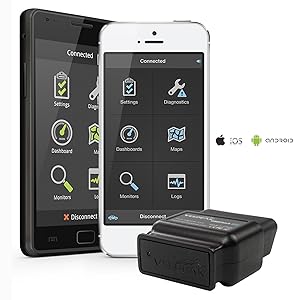
The OBDCheck BLE features dual-mode Bluetooth to work with iOS devices (iPhone or iPad) at Bluetooth LE mode, and Android devices at Classic mode. It is better than WiFi versions with much lower power consumption while allowing you to have access to internet for other apps via your cellular data.
Note:
1. For iOS devices, do not connect in Bluetooth Settings. Please contact in the OBD app.
2. For Android, it may not show as connected after pairing. You do not need to tap on it to connect again. Just start the App to proceed. Some Android head units are not compatible.
| Brand | Veepeak |
| Power source | OBD II Port |
| Product dimensions | 41L x 50W x 22H millimetres |
| Operating system | iOS & Android |
| Automotive Fit Type | Universal Fit |
| Manufacturer | Veepeak |


LJ-Automotive is a Global Retailer & Authorised Dealer of FK Automotive, Simoni Racing, Autostyle, RDX Racedesign, JOM & MTS Technik product ranges.
