


MON – FRI
08:00am – 17:00pm
SAT – SUN
08:00am – 17:00pm
 SHOP NOW - All Product Categories Here




















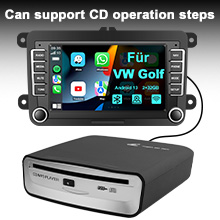
1.Link the optical drive USB cable to the car USB interface, so that you can put the CD disc into the optical drive disc port position. The optical drive automatically absorbs the disc and reads the disc music.
2. Then find the music playing icon in the central control display system, and click USB on the music playing interface. Optical drive read the track, you can choose the track to play, support square control operation.
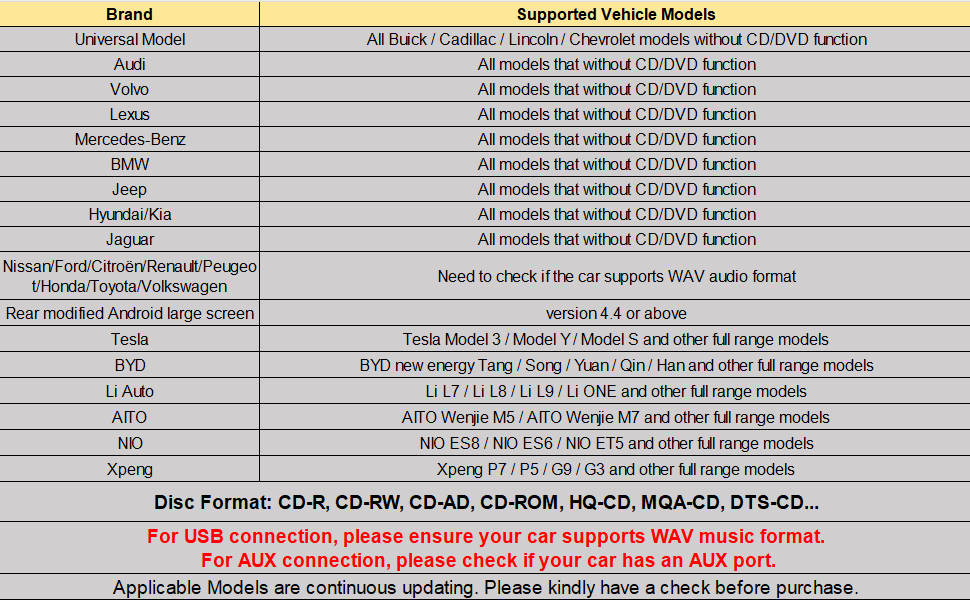
1. Also link the optical drive USB cable with the car USB interface, (any link to a USB interface, If no audio data is detected, please move to another USB port.) Put the CD disc into the drive port position. The optical drive automatically absorbs the disc and reads the disc music.
2.Then find the music playing icon in the central control display system, and click USB on the music playing interface. Optical drive read the track, you can choose the track to play, support square control operation.

Such as smart TV, TV set-top box, laptop desktop computer (without recording function) tablet computer, outdoor audio, home power amplifier and other devices with read USB interface as long as the WAV format can support playback, really a machine multi-purpose, meet all.

1.If the CD cannot be read, the vehicle host is not compatible with WAV music format. At this time, you can choose to use AUX input and FM transmitter to transmit the audio sound to the central control system (accessories for connection are all included in the package)
2. How to detect the performance of the disc player can be connected to the USB port of the desktop computer or laptop computer and put it into the CD. If you can read the CD content, the performance of the disc player is normal.

1.Plug the CD player into the USB port (USB 2.0) of your car radio.
2.Insert the CD disc.
3.Go to Media. Change source to USB ( Just need to Select USB ).
4.Then all the tracks with WAV format will be displayed on the screen of your car stereo after you plug the CD/DVD player into your car stereo via the USB port.
5.You can select one of the tracks to start playing music.

1. Connect the decoder Type-C interface with the USB port of the host car;
2. Connect one end of the audio cable to the decoder and the other end to the AUX interface of the host car;
3. Insert the disc drive into the USB interface of the decoder, and then place the CD-DA disc;
4. Enter the main interface of the host car and click
on the AUX function;
5. At this point you can listen to CD-DA music;
6. Click on the button on the decoder to perform the corresponding operation, or with the help of the remote control.

1. Connect the decoder Type-C interface with the USB port of the host car;
2. Insert the disc drive into the USB interface of the decoder, and then put the CD-DA disc into it.
3. Enter the main interface of the on-board host, open the FM function, and tune to FM87.1/FM87.3/FM87.5/FM87.8/FM88.2/FM88.5/FM88.7/FM107.3/FM107.5/FM108.0, At the same time, press "Mode" on the remote control to adjust to the corresponding frequency.
4. At this point you can listen to CD-DA music;
5. Click on the button on the decoder to perform the corresponding operation, or with the help of the remote control.

1. Because the reverse release of this product will reduce the reading and anti-vibration ability, the reverse release is prohibited in the disc state.
2. Because the product is assembled and adjusted by professional methods, it cannot be disassembled and adjusted at will.
3. Do not use it beyond the rated conditions of various electrical parts.
4. In order to ensure the normal operation of this product, the voltage of the power supply pin of this product is required to be between 4.75V~5.25V and rated at 5V.
5. Storage: This product should be stored in high temperature, wet and dusty places.
6. Handling: The product should be deformed by additional pressure.
7. When there is a disc already available in this product, do not forcibly insert the second disc.
8. Do not expose this product to a collision or fall.
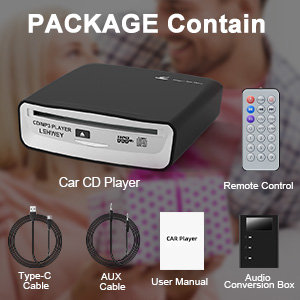
Operating Voltage / Current : DC 5V / min 1A
Outline Dimension: 155mm(D)x150mm(w)x40mm(H)
Operating Temperature Range : -10℃~+70℃
Disc Adaptability : ø12CM
External Interface : USB 2.0
Use the Placement Angle : Horizontal direction, and the disc mouth is facing up
Plate Access Loading Mode : Roller suction type
| Brand | Lehwey |
| Model name | Lehwey |
| Colour | Black |
| Connectivity technology | USB |
| Special feature | Portable |


LJ-Automotive is a Global Retailer & Authorised Dealer of FK Automotive, Simoni Racing, Autostyle, RDX Racedesign, JOM & MTS Technik product ranges.
